Fixing Hummingbird Logs on Railway
I deployed a perfectly healthy Hummingbird server to Railway and every log line showed up red: info, debug, all of it tagged as an error. Here's why it happens and how I walked through fixing it.
I deployed a Hummingbird server to Railway, opened the logs, and every single line was red. Info, debug, Hummingbird’s own request logs, all of it tagged as an error. The app was perfectly healthy. Requests were served, responses were correct, nothing was actually wrong. The dashboard just insisted everything was on fire.
This turned out to be a logging problem, not an application problem, and it comes from two separate defaults stacking up, each of which is reasonable on its own.
Why everything is red
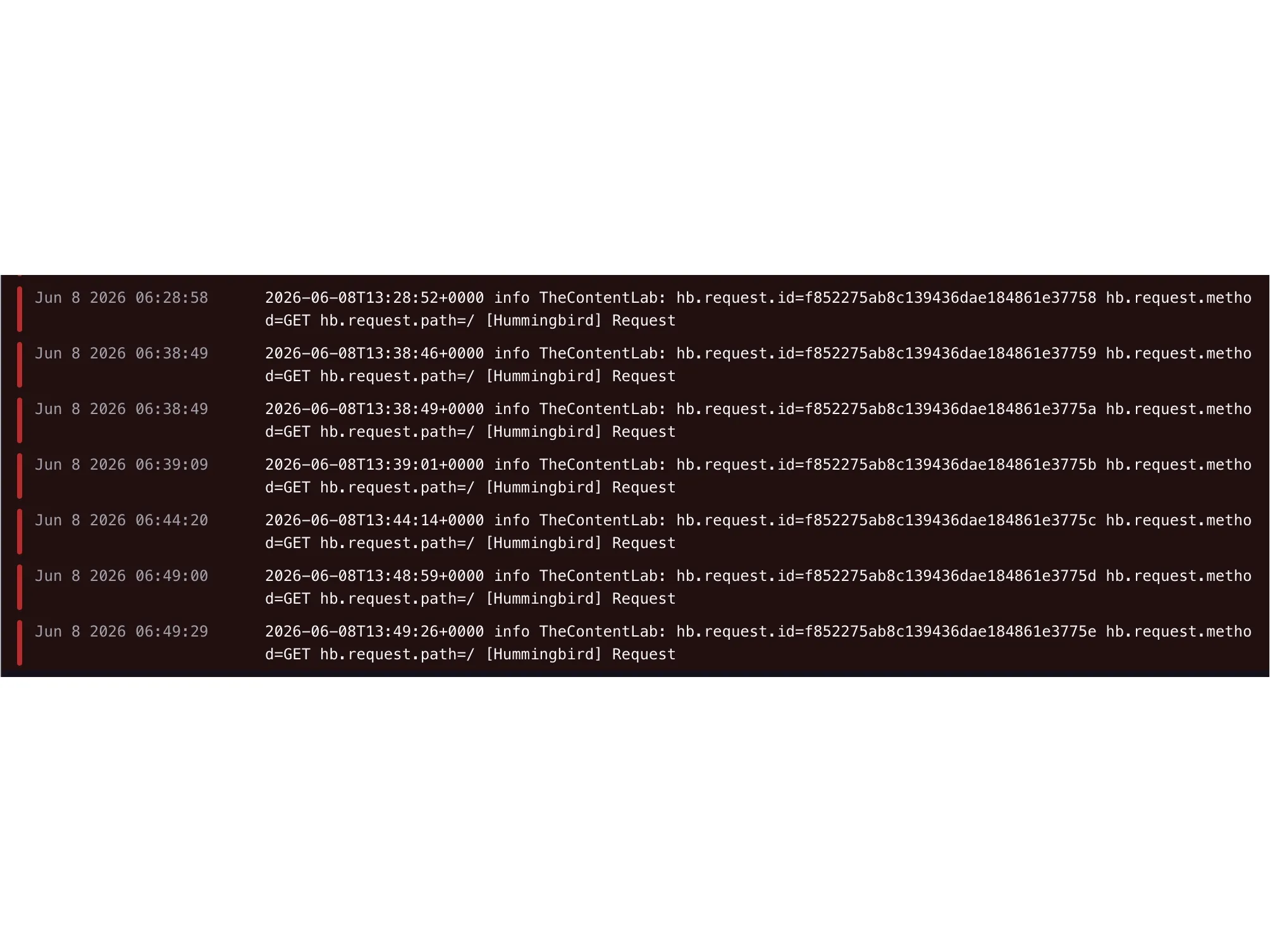
Hummingbird does all its logging through swift-log, so where those logs end up is entirely a matter of how swift-log is configured. Configure nothing, and it falls back to its built-in default: StreamLogHandler.standardError. That handler writes every log line (every level, including the request logs Hummingbird’s logging middleware emits on each request) straight to stderr.
Railway, for unstructured logs, decides severity based on which stream a line came in on:
- Anything on stdout becomes
info - Anything on stderr becomes
error
So if you never call LoggingSystem.bootstrap, all of your logs go out on stderr, and Railway dutifully reports every last one of them as an error. That’s the entire bug.
The app was never the problem. The logs were just going to the wrong stream, and Railway was labeling them based on the stream they came from.
The obvious fix is wrong
My first instinct was to bootstrap swift-log to write to stdout instead:
// Don't do this.
LoggingSystem.bootstrap(StreamLogHandler.standardOutput)
This does get rid of the red, but it just flips the problem over. Now everything is on stdout, so Railway tags every line as info, including your real errors. I traded “everything is an error” for “nothing is an error,” which is worse: now the actual failures are buried in a wall of info-level noise, and I can’t filter for them, because as far as Railway knows there aren’t any.
The problem isn’t the stream the logs go to. It’s that Railway uses the stream to decide severity at all.
The real fix: structured logging
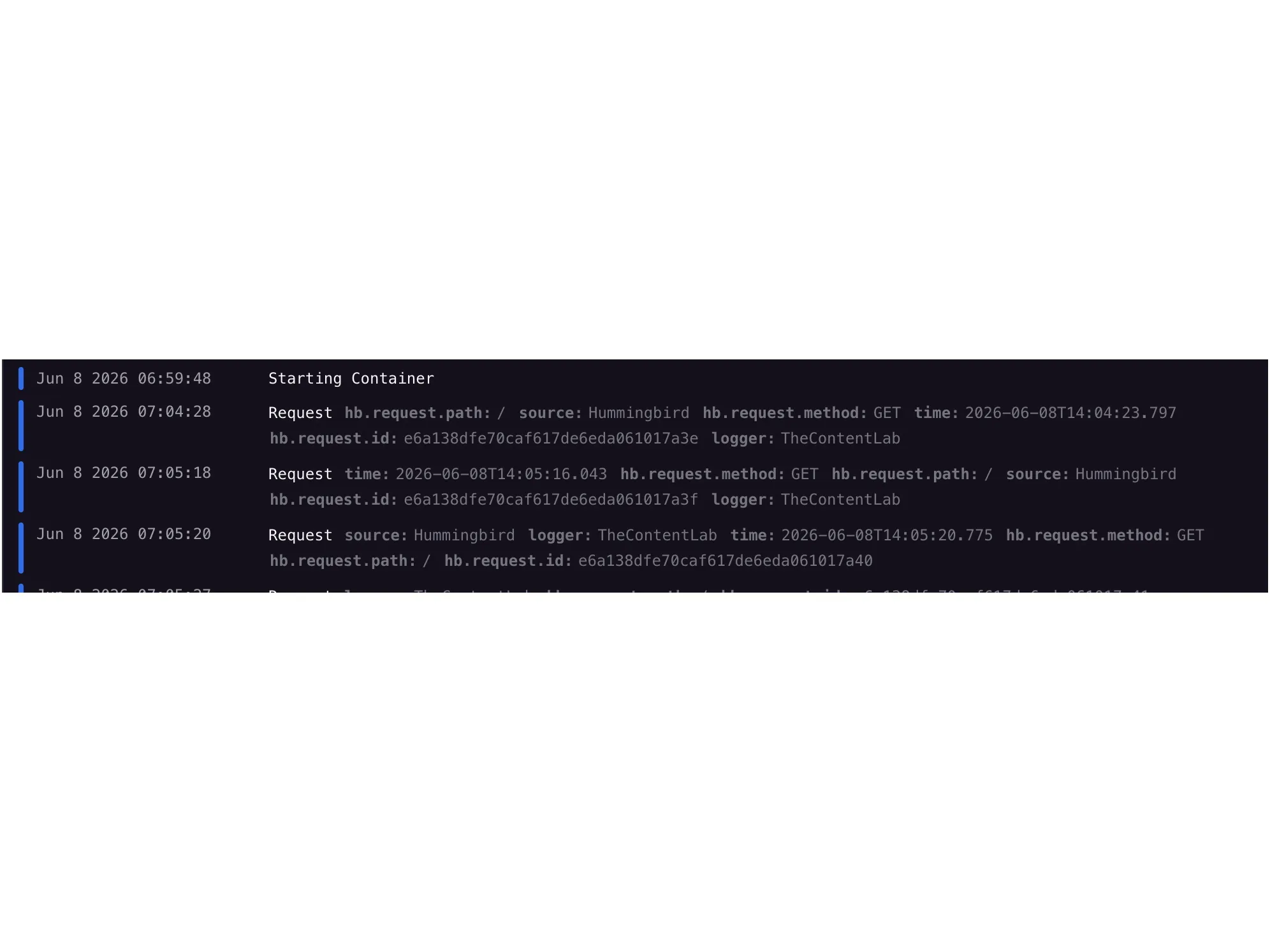
Railway parses structured logs. If each log line is a single line of JSON, Railway reads the level field straight off it instead of guessing from the stream. One log statement becomes one JSON object with the right severity already on it, and it stops mattering which stream it goes out on.
So I needed a swift-log LogHandler that turns each log statement into one compact line of JSON. The fields I went with are time, level, message, source, the logger label, the merged metadata, and an error if there is one.
The only piece that needs translating is the level. swift-log has seven of them and Railway understands four, so I map them down:
| swift-log level | Railway level |
|---|---|
trace, debug | debug |
info, notice | info |
warning | warn |
error, critical | error |
Here’s the handler. Ignore the two // see below comments for now; those mark the Swift 6 traps I’ll get into in the second half of this post.
import Foundation
import Logging

struct JSONLogHandler: LogHandler {
    let label: String
    var metadata: Logger.Metadata = [:]
    var logLevel: Logger.Level = .info

    subscript(metadataKey key: String) -> Logger.Metadata.Value? {
        get { metadata[key] }
        set { metadata[key] = newValue }
    }

    func log(
        level: Logger.Level,
        message: Logger.Message,
        metadata explicitMetadata: Logger.Metadata?,
        source: String,
        file: String,
        function: String,
        line: UInt
    ) {
        // Merge the handler's metadata with anything passed at the call site.
        var merged = self.metadata
        if let explicitMetadata {
            merged.merge(explicitMetadata) { _, new in new }
        }

        var entry: [String: Any] = [
            "time": Date().ISO8601Format(           // see below: trap #1
                .iso8601(timeZone: .gmt, includingFractionalSeconds: true)
            ),
            "level": Self.railwayLevel(for: level),
            "message": message.description,
            "source": source,
            "logger": label,
        ]

        if !merged.isEmpty {
            entry["metadata"] = merged.mapValues { "\($0)" }
        }

        guard
            let data = try? JSONSerialization.data(withJSONObject: entry),
            var line = String(data: data, encoding: .utf8)
        else { return }

        line.append("\n")
        // see below: trap #2, write through FileHandle, not the C stdout global.
        FileHandle.standardOutput.write(Data(line.utf8))
    }

    /// swift-log has seven levels; Railway understands four.
    static func railwayLevel(for level: Logger.Level) -> String {
        switch level {
        case .trace, .debug:    return "debug"
        case .info, .notice:    return "info"
        case .warning:          return "warn"
        case .error, .critical: return "error"
        }
    }
}
Bootstrapping it, exactly once, at the very start of @main
LoggingSystem.bootstrap has to run before anything asks for a Logger, and it has to run exactly once, because swift-log traps the process if you call it twice. That second rule is what decides where it goes.
It belongs at the top of @main, before you build the Hummingbird Application and hand it a Logger:
import Hummingbird
import Logging

@main
struct App {
    static func main() async throws {
        let logLevel = Logger.Level(
            rawValue: ProcessInfo.processInfo.environment["LOG_LEVEL"] ?? "info"
        ) ?? .info

        LoggingSystem.bootstrap { label in
            var handler = JSONLogHandler(label: label)
            handler.logLevel = logLevel
            return handler
        }

        let app = try await buildApplication(logLevel: logLevel)
        try await app.runService()
    }
}Do not put bootstrap inside buildApplication. Hummingbird’s test setup
calls that function on every test, and a second bootstrap call traps the
process. Bootstrap is a @main responsibility; buildApplication should only
build the app.
The LOG_LEVEL lookup matters more than it looks. swift-log throws away anything below the configured threshold before it ever gets written, so whatever level you bootstrap with decides what even has a chance of reaching Railway.
The two Swift 6 concurrency traps
The handler above looks simple, but getting it to actually compile and run under Swift 6 strict concurrency on Linux (which is what Railway runs) is where I lost most of my time. Both of these are the kind of bug that compiles fine on your Mac and only falls over in CI.
Trap #1: ISO8601DateFormatter is not Sendable
For a log handler, the obvious move is to make the date formatter static so you’re not allocating a new one on every log line:
// Won't compile under Swift 6 strict concurrency.
static let formatter = ISO8601DateFormatter()
ISO8601DateFormatter is a class, and it isn’t Sendable, so a shared static instance is exactly the kind of shared mutable state strict concurrency won’t allow. A log handler gets called from every thread in the process, so this isn’t some theoretical race; it’s the entire reason the type exists.
The fix is the value-type format style, which is a struct and carries no shared state:
Date().ISO8601Format(
    .iso8601(timeZone: .gmt, includingFractionalSeconds: true)
)
No static, no class, no Sendable problem. Each call formats its own value and walks away. That’s the line you already saw up in the handler.
Trap #2: the C stdout global isn’t safe on Linux
My first version of the writer reached straight for the C standard library, locking the stdout global and pushing the bytes through fputs and fflush:
// Compiles on macOS. Rejected on Linux under Swift 6.
flockfile(stdout)
fputs(line, stdout)
fflush(stdout)
funlockfile(stdout)
This compiled and ran fine on my Mac, so I pushed it. Then CI, building on Linux against Glibc, rejected it outright. On Glibc, stdout is a global mutable pointer, and Swift 6 sees that as concurrency-unsafe shared mutable state. Darwin exposes stdout differently, which is the only reason the same code passed locally and then broke the moment it hit Linux. It was the classic “works on my machine,” except the machine in question was the C library.
The fix is to skip the C global entirely and write through FileHandle:
FileHandle.standardOutput.write(Data(line.utf8))FileHandle.standardOutput never touches the stdout global, so there’s nothing for the compiler to flag, and it behaves the same on Darwin and Linux. That’s the write call back in the handler.
One last thing: set LOG_LEVEL in Railway
The handler defaults to info, and remember that swift-log drops anything below that threshold before it ever gets written. So if you want debug lines showing up in Railway, you have to set LOG_LEVEL=debug in your service’s variables. Otherwise those lines never even leave the process, and no amount of filtering in the dashboard will bring them back.
Wrapping up
The wall of red is a stream-tagging artifact, not a broken app:
- swift-log’s default handler writes everything to stderr.
- Railway tags stderr as
errorand stdout asinfo. - Pushing everything to stdout just hides your real errors, so don’t.
- Emit single-line JSON with a
levelfield and let Railway read severity directly. - Bootstrap once, at the top of
@main, before building the app. - Format dates with the value-type
ISO8601Formatstyle, and write throughFileHandle.standardOutput(not the Cstdoutglobal) so it holds up on Linux. - Set
LOG_LEVELin Railway’s variables so the lines you want actually get written.
I'm looking for my next thing, whether that's full-time, consulting, or a long-term contract. If you're building something where the details matter, I'd like to hear about it. Send me an email.